Like every version since Exchange 2000, Exchange 2010 has a huge dependency on Active Directory. Essentially, if you don’t deploy and manage Active Directory in the right way, you have little or no chance of being successful with an Exchange 2010 deployment. If you disbelieve me, simply break out the schema update files from the Exchange 2010 installation kit to see the number of changes that Exchange makes to the Active Directory to store all the information it needs about mail-enabled objects, its configuration, and other objects.
Greenfield deployments have always been the easiest for Exchange. Things become more interesting when you have to cope with the debris of previous deployments. Of course, the problems are entirely due to other administrators who are now long gone and have left you to clean up the mess. Some of those issues might be lingering problems in Active Directory that come to the surface during the deployment of Exchange 2010 and that’s what I want to cover here.
Recently, online forums have described two problems that have caused administrators grief as they work with Exchange 2010. Both share the same fundamental root cause in that Exchange 2010 is unable, for some reason, to update or create information in Active Directory. The first issue I’ll discuss is when you can’t create a new mailbox move request for some reason. In this example, we create a new move request to move my mailbox by running the New-MoveRequest cmdlet in the Exchange Management Shell (EMS):
PS C:> New-MoveRequest -Identity 'Redmond' -BadItemLimit 10 -MRSServer exserver1.contoso.com -TargetDatabase DB2

New-MoveRequest : Active Directory operation failed on AD-Root.contoso.com. This error is not retriable. Additional information: Insufficient access rights

to perform the operation.

Active directory response: 00002098: SecErr: DSID-03150BB9, problem 4003 (INSUFF_ACCESS_RIGHTS), data 0

At line:1 char:16

+ New-MoveRequest <<<< Redmond

+ CategoryInfo : NotSpecified: (0:Int32) [New-MoveRequest], ADOperationException

+ FullyQualifiedErrorId : A7516A9,Microsoft.Exchange.Management.RecipientTasks.NewMoveRequest
Bang! The move request fails immediately and we’re told that the problem is with Active Directory. We can also see that it’s due to insufficient access rights. The reason here is that a move request causes the Mailbox Replication Service (MRS) to update several attributes in the user object that MRS uses to track and report the progress of a move. Some of the attributes are static and some (like the move status) are updated as the move progresses. You can retrieve this data with the Get-MoveRequest cmdlet. The attributes are:
- msExchMailboxMoveBatchName (batch name for the move request, if specified)
- msExchMailboxMoveFlags (any flags specified for the move)
- msExchMailboxMoveRemoteHostName (the name of the remote host if MRS is pushing mailbox data to a legacy Exchange server)
- msExchMailboxMoveSourceMDBLink (the source database)
- msExchMailboxMoveStatus (the current status – for example, “Queued”)
- msExchMailboxMoveTargetMDBLink (the target database)
These attributes are removed from the user object when the move request is cleared with the Remove-MoveRequest cmdlet (or from EMC). However, to begin a move, MRS has to be able to update Active Directory and if it can’t, the move hits a brick wall and fails immediately. There is no workaround and in Exchange 2010 RTM there’s also a nasty side-effect of the problem in that MRS creates an orphaned move request for the mailbox in the system mailbox of the source database. If the administrator fixes the Active Directory permissions problem and attempt to run New-MoveRequest again, MRS detects the orphaned move request in the system mailbox and will refuse to create the move request. You then have to remove the orphaned move request by running the Remove-MoveRequest cmdlet and specifying the source database name in the –MoveRequestQueue parameter. For example:
Remove-MoveRequest -MoveRequestQueue 'DB2'
Microsoft improved the situation in Exchange 2010 SP1 by removing the need to clean up the orphaned move request. In SP1, if you create a move request for a mailbox where an orphaned move request exists, MRS overwrites the orphan move request with the information for the new move request.
But why would such a problem occur? After all, are Exchange 2010 system components not granted access to Active Directory through the Exchange Trusted Subsystem? The answer is that the Exchange Trusted Subsystem indeed has very privileged and powerful access to Active Directory but it cannot deal with situations where the Access Control Entries (ACEs) that Exchange depends upon are not stamped onto user objects for some reason. When this happens, any attempt by Exchange (through MRS or another component) to update the object is declined by Active Directory and we get into the situation of the failed move request.
Another example of where Exchange 2010 runs into permission problems is when it attempts to create child objects for devices that synchronize with Exchange using ActiveSync. The objects are msExchangeActiveSyncDevices (the list of devices that a user mailbox has used for synchronization) and msExchangeActiveSyncDevice (for each device to track its synchronization characteristics). The first time a mailbox attempts to synchronize using ActiveSync, Exchange 2010 attempts to create these child objects for the user object. If this succeeds, synchronization proceeds and all is well. If Exchange is blocked by Active Directory permissions, synchronization fails and event 1053 for MSExchange ActiveSync is logged in the Application Event Log. The event detail is similar to the MRS error described above – unable to create the container under the user object.
AdminSDHolder is one of the most common reasons why ACEs don’t get stamped on objects. The logic behind AdminSDHolder is impeccable as it helps to secure user accounts that possess elevated Windows permissions. Administrator accounts – ones that are members of protected groups such as “Administrators” are protected by AdminSDHolder and have ACL inheritance turned off. A process called SDPROP runs every 60 minutes (default interval) on the PDC to check the ACL of protected groups such as Administrators and reset their inherited permissions to that specified for the AdminSDHolder object. The account shown in the screen below is an example – note the circled checkbox – and the really interesting thing is that this can happen as the result of group membership that has long since been removed from the user account. The best way to check for accounts that are under the control of AdminSDHolder is to search for accounts whose admincount attribute is set to 1 (one). Do this as follows:
1. Start a Windows PowerShell session
2. Import the Active Directory module
Import-Module ActiveDirectory
3. Execute the Get-ADUser cmdlet to find the user accounts with admincount = 1
Get-ADUser -LDAPFilter "(objectcategory=person)(samaccountname=*)(admincount=1)"
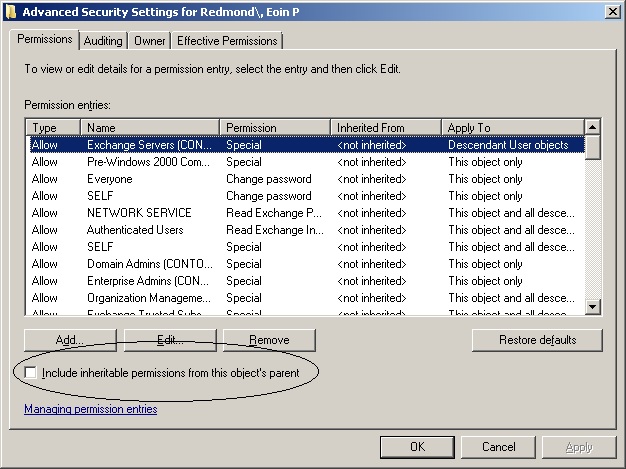 User account with inherited permissions turned off
AdminSDHolder is the most common cause but any action that stops the ACEs necessary to allow Exchange to manipulate user objects will cause a lot of problems for Exchange 2010.
To fix the problem for a user object, you have to reset its admincount attribute to 0 (zero) (I use ADSIEdit for this purpose) and then check the “Include inheritable permissions from this object’s parent” box. If you don’t reset admincount, you will find that everything works OK until the next time that SDPROP runs, at which time the checkbox will be unset again.
It’s a bad, bad, bad idea to mail-enable administrative accounts as there should be a clear separation between accounts that are used to manage servers and those that people use for access to applications such as email. This is as true today as it was in the days of ALL-IN-1 and IBM PROFS as it prevents accidents happening when administrators perform tasks with their elevated permissions turned on – like deleting files that they really should have kept. It’s always best to keep administrative and “other work” activities separated with different accounts, even if it is a pain to switch accounts sometimes just to read some email – but at least your mobile devices will keep working.
The word is that the problems described here tend to affect highly privileged user objects that were created before the deployment of Exchange 2010. Objects created subsequently don’t seem to have the same problems. I can’t quite work out why the newer objects are more resistant but I can report that I have had no problems moving mailboxes for users who don’t have inherited permissions using Exchange 2010 SP1.
After all of that, the bottom line therefore is that migration projects that are moving from Exchange 2003 or Exchange 2007 to Exchange 2010 may run into problems moving or synchronizing mailboxes if they have accounts with elevated administrative permissions that are used to access email.
– Tony
Follow Tony @12Knocksinna
For more information about Exchange 2010 SP1, see Microsoft Exchange Server 2010 Inside Out


 Thoughtsofanidlemind's Blog
Leave a comment