As I work through the process of understanding Exchange 2013 so that I can write about it for “Microsoft Exchange 2013 Inside Out”, various odd thoughts come into my mind. One of those that recently arrived was that Microsoft has dumbed down the new Exchange Administration Center (EAC) when it comes to Database Availability Group (DAG) management. On the surface, it seemed like the Exchange Management Console (EMC) in Exchange 2010 gives administrators more control over the DAG, member servers, and databases, but when you work things through the situation is not quite as clear-cut.
The DAG was brand-new in Exchange 2010. Accordingly, although the developers did their very best to make the DAG easy to work with, some flaws exist. For example, it must have seemed like a very good idea to display the copy queue length and replay queue length for a database copy to flag potential replication problems to administrators. It’s absolutely true that knowing that logs are accumulating on these queues is an indication that all might not be right in the DAG, but the problem is that EMC only ever shows a snapshot of replication activity that’s accurate when EMC checks queue lengths. To be totally accurate, you’d need to have EMC refresh its data at a frequent interval, something that would impose a load on Exchange.
The processing overhead required to query servers about replication activity might be acceptable for a small DAG where Exchange only needs to check ten or so database copies spread over two or three servers. I can imagine big problems if you’d ask EMC to check the status for a hundred databases spread over ten servers – apart from the processing load, it would probably take EMC a few minutes to collect all the data from the servers and display the information and by that point the data is stale and needs to be refreshed again, so we get into a continuous loop of fetch and display. Not good…
Speaking of stale data, you might even get into a situation where EMC displays the famous copy queue length of 9,223,372,036,854,775,766 (see below), which seems like quite a lot of replication to get through! The reason, as explained in Tim McMichael’s excellent blog, is that despite the database copy in question being reported as “Healthy”, for some reason (potentially because the Replication Service on the server hosting the copy is stopped) a divergence has opened up between the timestamp (made available to DAG members though the cluster registry) for the last available log generated by the active copy and the system time on the server hosting the problematic copy. If the divergence is more than 12 minutes it could cause a problem if Active Manager attempted to activate this database copy because the potential exists that some logs are available for the previously active copy that will be ignored if this copy is brought online. Cue hole in database syndrome…

Exchange detects these conditions and considers that replication is “stale”. To stop automatic activation, Exchange sets the copy queue length to 9223372036854775766 on the very sensible basis that such a number is going to exceed the AutoDatabaseMountDial setting for the server and so prevent Active Manager activating the copy automatically.
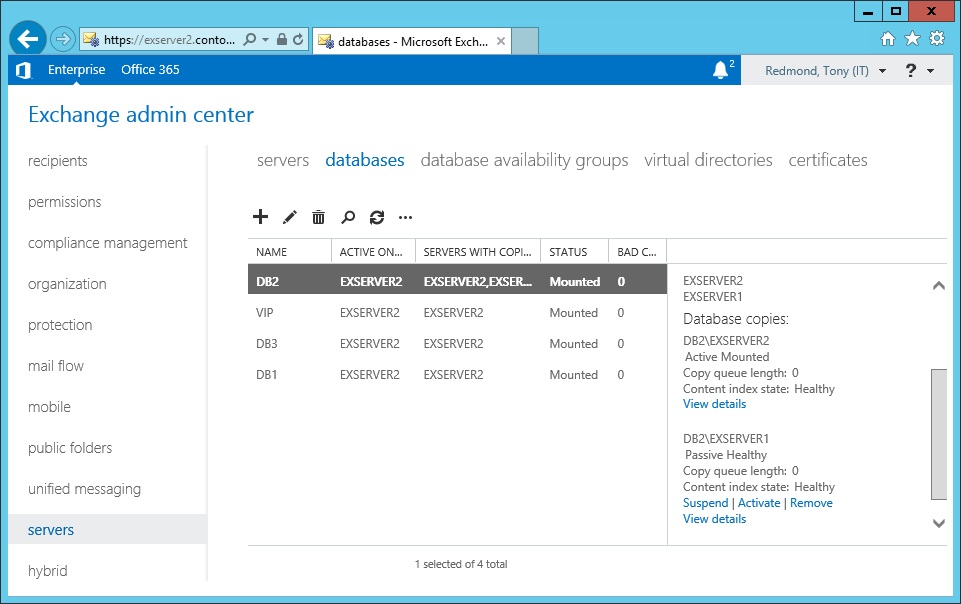
Getting back to EAC, the only way that you now see details of the copy queue length and replay queue length for a database copy is to select the relevant copy and then click the View Details link. This exposes all the relevant information, meaning that this isn’t another case where EAC is less functional than EMC – it’s just different and arguably a better implementation. If you prefer not to go through the somewhat tiresome select and click routine to check multiple database copies, you can simply run the Get-MailboxDatabaseCopyStatus command to review the replication status for all databases, or those belonging to a specific server or DAG.
I don’t mind that Microsoft has simplified matters by not displaying replication queue information for the DAG. It is in line with other efforts to simplify DAG management, such as removing the need to collapse DAG networks when DAGs extend across multiple subnets. In fact, Exchange 2013 prefers that you leave DAG network management to it.
Simplification and automation are good so I approve of what’s been done to make DAG management easier in Exchange 2013. Once they fix the fit-and-finish problems exhibited by the current version of EAC, it seems like some real progress will have been made over EMC.
Follow Tony @12Knocksinna


 Thoughtsofanidlemind's Blog
Leave a comment