One of the lesser discussed updates included in Exchange 2010 SP1 is the addition of database redundancy monitoring by the Microsoft Exchange Replication service. This occurs for databases that are in a Database Availability Group (DAG) and is intended to ensure that each replicated database has sufficient healthy copies to make it redundant. In this context, sufficient means at least two copies and a healthy copy is one that is online and has no problems copying or replaying transaction logs.
Exchange 2010 SP1 contains a script called CheckDatabaseRedundancy.ps1 in the default \Scripts folder. You can run the script interactively to check a database and it is also possible to incorporate the script into Microsoft SCOM monitoring. See the Exchange 2010 SP1 CHM for details.
What’s interesting to me is that the same script is run hourly by the Microsoft Exchange Replication service to perform a redundancy health check for replicated databases . If Exchange finds that a replicated database doesn’t have sufficient healthy copies, the Microsoft Exchange Replication Service (MSExchangeRepl) logs event 4113 as shown below.
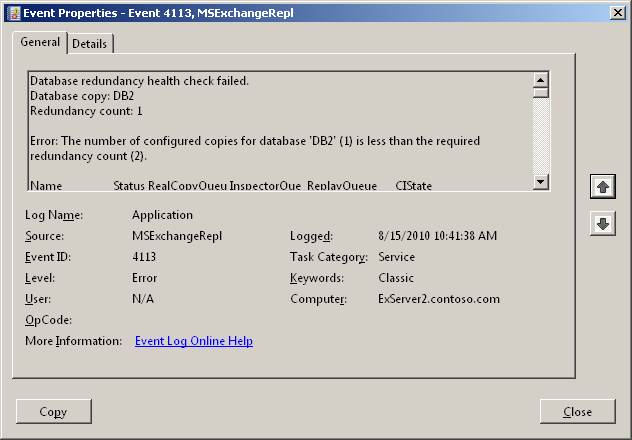
In this instance I had a database (DB2) that had just been added to the DAG and no database copies apart from the active had yet been generated. The information captured in the event reports that only one copy exists, which is what I expected. The Replication Service will continue to check and log event 4113 for the database every twenty minutes until it goes into a state where sufficient redundancy exists to accommodate an outage and allow the failed copy of the database to failover to a healthy copy.
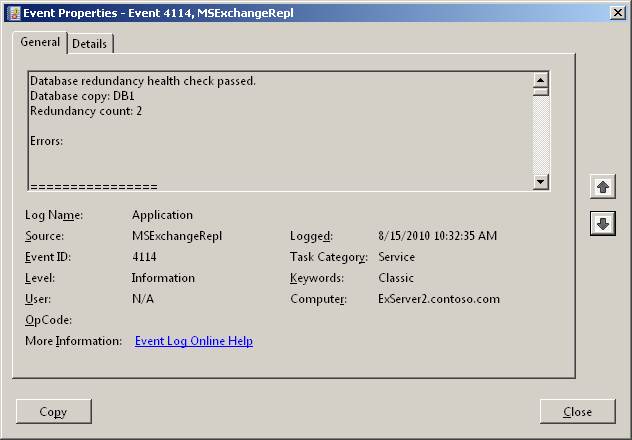
Event 4114 is logged for replicated databases that pass the redundancy health check. As you can see from the screen shot above, database DB2 has passed the health check because two healthy copies are available. If you scroll on down through the event details, you can see other information such as the replay and copy queue lengths for the copies.
Of course, you can debate the threshold that Microsoft has selected for database redundancy. In production environments, two copies is probably not sufficient to ensure the kind of redundancy that many companies demand, but it is enough to ensure that the DAG can cope with an outage that affects the disk that holds the database (or its transaction logs) or the server on which the database is mounted. As such, two copies is redundant enough for the purpose of illustration and initial deployment if not for long-term protection.
One interesting point is that Exchange 2010 uses the Windows 2008 Task Scheduler to run CheckDatabaseRedundancy.ps1 to check database copies. Exchange 2010 SP1 introduced a dependency on the Task Scheduler in that if this service is disabled on a server, you won’t be able to install the mailbox role. Not many people disable the Task Scheduler, so it’s not a problem that is encountered often but there are instances where overly-zealous Windows build engineers disable anything and everything before handing a server over to the Exchange deployment team who then see the problem illustrated below. The issue is obvious “The Task Scheduler Service is not running” but you might just wonder why this is a problem for Exchange. Now you know… To be fair to the Microsoft engineers, they know about this issue and are working out how to make it go away, probably by implementing the dependency check as part of adding a mailbox server to a DAG, which seems like the right place to test for a service that has to be running to validate database redundancy.

In any case, the point is that enabling a redundancy check for database copies is a nice example of proactive monitoring that has found its way into Exchange 2010 SP1, something that may just make the life of administrators a little easier, especially as they tease out the complexities of DAGs under the stresses and strains of real-life production environments.
– Tony
Find out more interesting details about Exchange 2010 SP1 with a copy of my Microsoft Exchange Server 2010 Inside Out


 Thoughtsofanidlemind's Blog
Leave a reply to STGdb Cancel reply