One of the common things that OWA users notice about Exchange 2013 is that outgoing messages sometimes appear to get “stuck” in the Drafts folder. Not only do messages seem to linger in Drafts, no trace of the outbound messages ever shows up in the Outbox. Or so it seems, but really it’s an urban myth.
Exchange 2013 boasts a new architecture. The hub transport server role is no more and its processing has been subsumed into the mailbox server role. In turn, as the TechNet description of the Exchange 2013 mail flow makes clear, the Mailbox Transport service and the Transport service work together to process messages sent by clients.
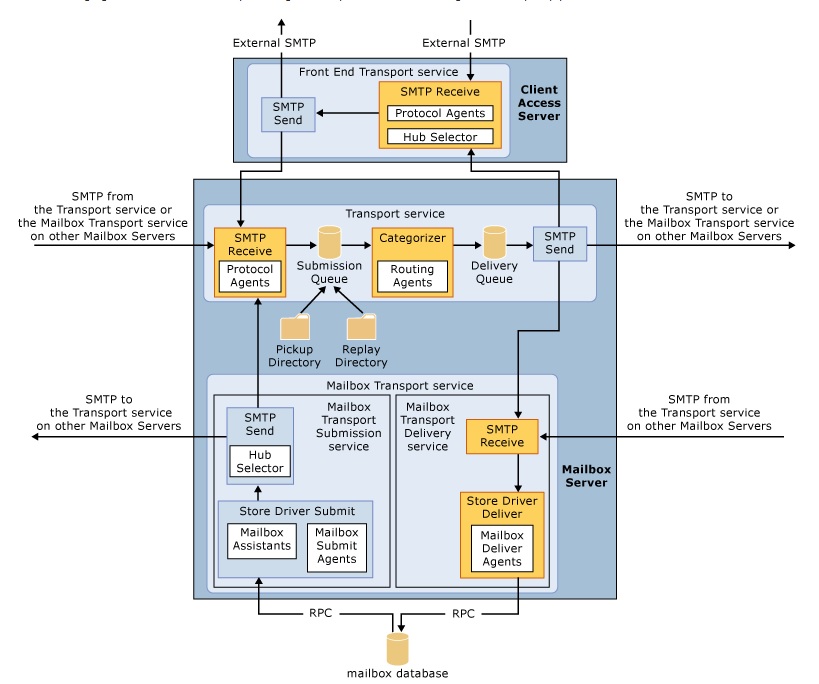
But how does the Drafts folder come into the picture? Well, OWA clients automatically capture copies of messages as they are being composed and store them in the Drafts folder. When the user issues a sent command, the Mailbox submit agent (running within the Store driver) takes over and processes the outbound message by giving it to either the Transport service running on the same mailbox server or to the Transport server running on another mailbox server. The connection is made via SMTP.
Messages stay in the Drafts folder until they are successfully sent by being processed by the transport service. At this point, items are moved into the Sent Items folder. OWA 2013 behaves in the same way as OWA 2010 – nothing has changed in the way that messages are held in the Drafts folder until dispatch. What might account for user descriptions of items being “stuck” is when a problem occurs somewhere in the transport pipeline that prevents outbound messages being processed.
For instance, items will remain in the Drafts folder if the Store cannot pass them to the transport system. If the transport service is not running on any available server or the mailbox transport service is not running on the mailbox server that hosts the active database for the user’s mailbox, items will stay in the Drafts folder until the services come online and Exchange is able to process outbound items.
Now, the normal state of events is that all of the Exchange services are running along quite happily on the server. Certainly, if a service fails or is not running for some reason, it’s likely that the administrator will notice that this is the case and fix the problem. What else would stop transport being able to process outbound messages and force the Store to keep them in the Drafts folder?
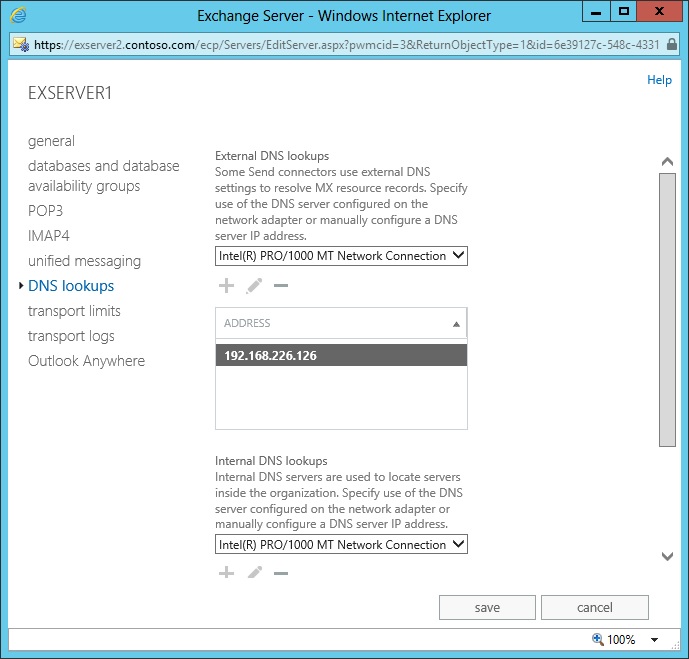
Incorrect DNS binding to server NICs is one of the likely culprits. Unless the Exchange 2013 servers know how to route messages, the items stay where they are. Like any email server, Exchange makes heavy use of DNS, so it’s logical that if DNS is not configured properly, then messages are not going to be transported to either internal or external destinations. If users report “stuck” messages, you might just want to take a look at server properties with EAC to make sure that DNS lookups point to the right place (a server can that resolve the lookups). You can also check with EMS by running the Get-TransportService cmdlet to retrieve the ExternalDNSServers and InternalDNSServers properties.
If the server properties reveal that DNS lookups are going walkabout, you’ve just found the problem. On the other hand, if the DNS configuration is correct, you might have to talk to Microsoft Support to see why transport isn’t working as expected. I hear rumblings that Microsoft has improved the way that Exchange interacts with DNS in Exchange 2013 CU1 but we shall have to wait for that release to verify if this is correct.
Outlook processes outbound messages differently because it does use the Outbox folder. Remember that Outlook can be a client for many different versions of Exchange and other email servers. Where OWA keeps messages in the Drafts folder, Outlook continues to do what it has done for years and moves outbound items through the Outbox en route to Sent Items. When messages are stuck in the Outbox, it’s probably due to another factor such as messages being too large for the server to accept. In effect, items in Outlook’s Outbox folder have the same status as items in OWA’s Drafts folder – both are candidates to become outbound items that will be processed by the transport service.
Messages don’t get stuck in the Drafts folder without good reason. It’s not as if Exchange wants to keep messages there. After all, it is an email server after all… and email servers that don’t send messages would not be much good!
Follow Tony @12Knocksinna


 Thoughtsofanidlemind's Blog
Leave a reply to Exchange 2013 und 2016: Mails bleiben in Entwürfe hängen – Andreas' Blog Cancel reply